Contents
Deploying OpenClaw Changed How I Think About Organizations and Education
1. What is OpenClaw, and why try it?
OpenClaw, originally called Clawdbot and briefly known as Moltbot, is an open-source AI agent system, also nicknamed the lobster 🦞 online. It connects to a model API as its brain, can call tools and skill libraries, and integrates with messaging apps such as WhatsApp and Feishu. It connects conversation to task execution in an automated loop.
OpenClaw's official introduction (https://openclaw.ai)
You might say: isn't this just another agent? They are everywhere now. I thought so too, until I deployed it myself and found a few answers—and some aha moments. Here are the details. First, two observations about why OpenClaw took off. I think the first matters more than the second:
- Connecting OpenClaw to messaging apps such as Feishu turns it from a tool into a presence. It breaks out of the impersonal web chat box. The immediacy of messaging encourages us to perceive AI as a digital person, moving it from conversation alone into an active role. This matters. So far, I have not seen other bloggers discuss it in these terms.
- Unlike models that mainly offer advice through chat, OpenClaw runs on a local computer and can use local permissions, tools, and data. That ability to act lets it evolve from adviser to doer. There is a common misconception here: many people think OpenClaw is an entirely local AI agent. More precisely, its hands and feet—the execution environment—are local, while its brain—the inference capability—usually remains in the cloud through model APIs. This architecture combines data privacy and local operating permissions with the intelligence of leading models.
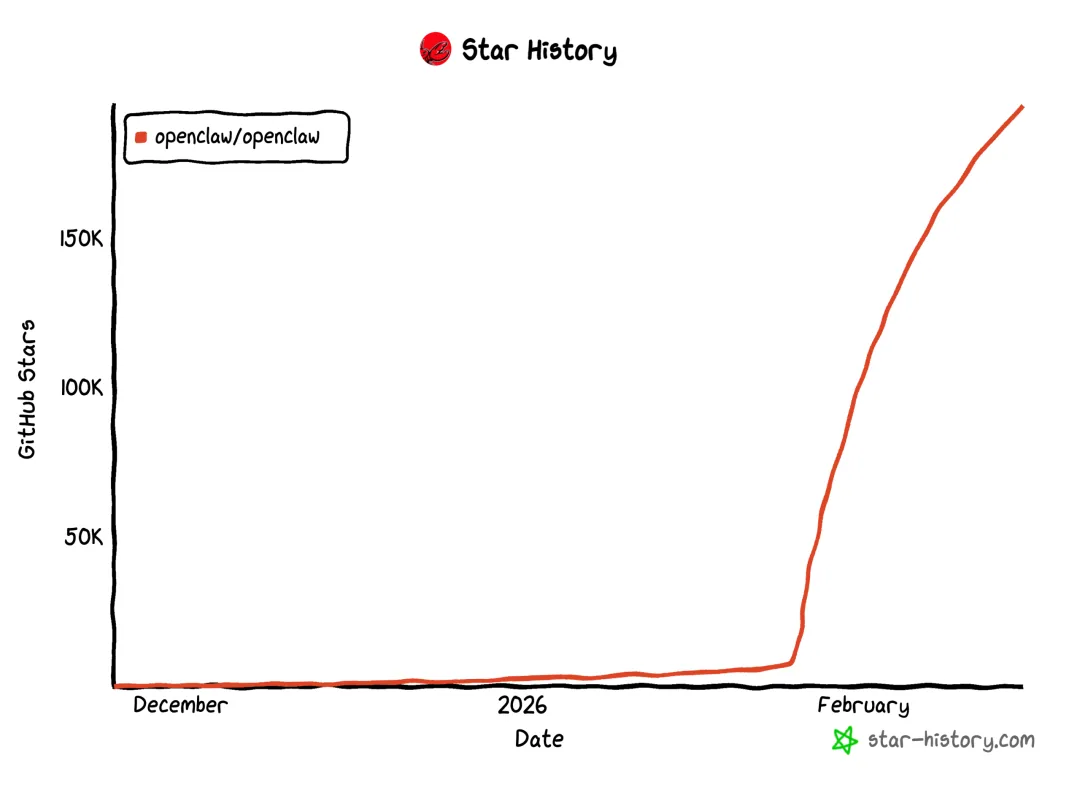
OpenClaw's surge in the open-source community
2. Rethinking organizations: when science fiction becomes a useful analogy
I often bring up Liu Cixin's work because it gives us so much to think about. In The Village Teacher, he describes human communication as sound waves produced by vibrating air, moving information very slowly—at just 1–10 bits per second.
Human communication as seen by an advanced alien civilization in The Village Teacher
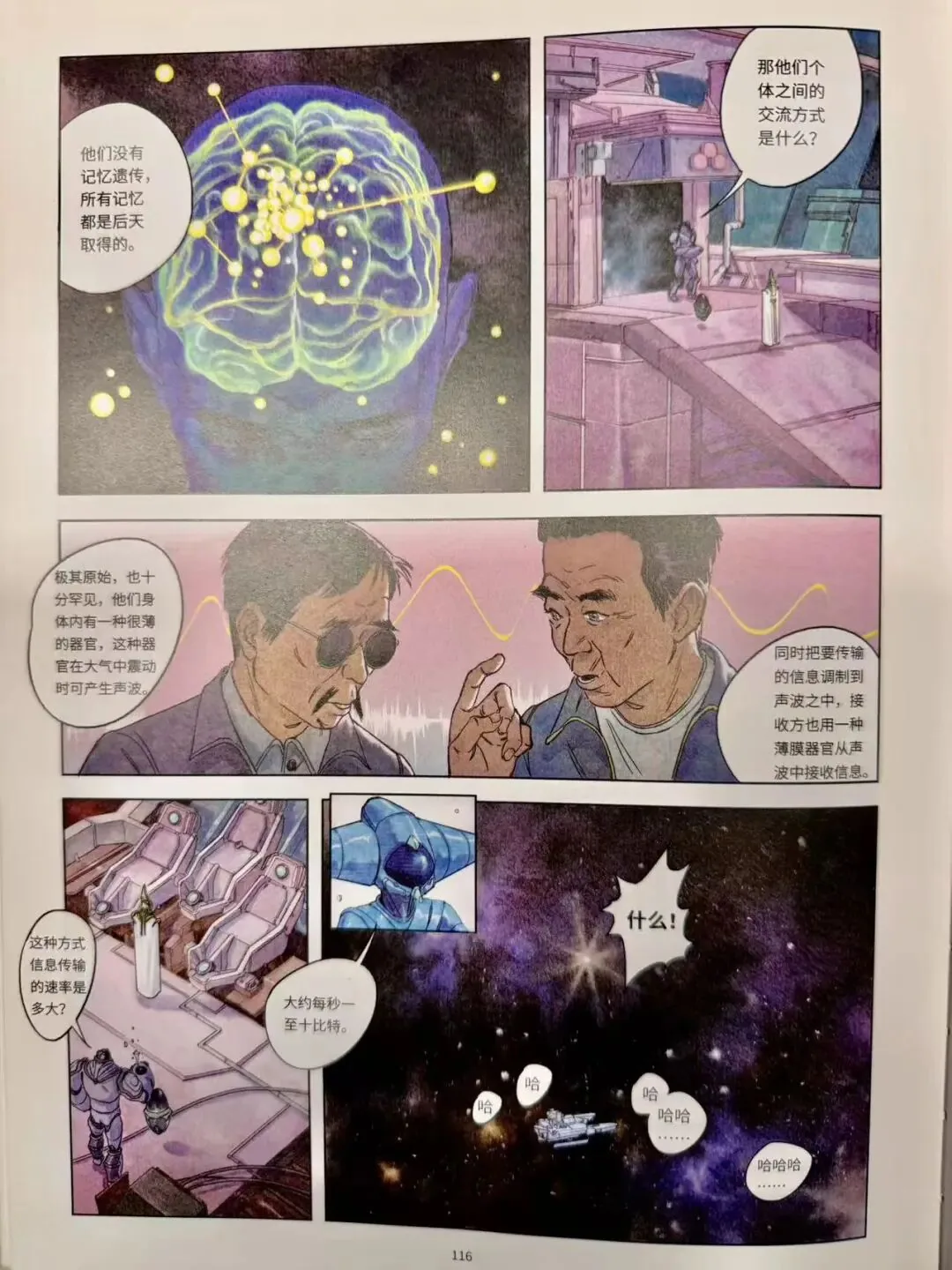
That low bandwidth keeps our minds separate, creates suspicion, and makes communication costly. Because so little is transmitted, we fill in the gaps ourselves. Everyone fills them differently: the same sentence can be understood in different or even opposite ways. So sometimes, yes, you should add that emoji 😄
Whether we use speech, text, or memes, our main means of communication is still language. Imagine human communication becoming a thousand or ten thousand times faster. What would happen to social structures and civilization? We have seen a version of this with online payments. Moving from the slow circulation of physical cash to digital transfers arriving in milliseconds did more than speed up payment. It changed the underlying economics, removing transaction friction and enabling businesses such as the sharing economy and instant credit that were hard to imagine in the slower era.
The same logic applies when information and skills move from a crawl to the speed of light: it can change how organizations work at their foundations. Developments such as model communication conventions—including MCP and skills—and brain–computer interfaces make me think that change is already underway.
AI is creating new communication conventions. Agents do not need meetings to get aligned; they can call interfaces and share experience libraries directly. That leap may provide the physical basis for a ten-thousandfold improvement in efficiency.
For a concrete example, suppose two people each deploy their own OpenClaw agent. By sharing skills, data, and tools, the agents can align their capabilities immediately, without training from scratch.
This is more than a speed increase; it changes how collaboration works. In future organizations, agents will handle vast amounts of high-bandwidth information exchange. Machines will focus on efficiency—how to do things—while humans concentrate on direction—what to do and why—and on values.
Humans communicate and think through language, which carries our knowledge and civilization. Large models are also called large language models, or LLMs. In training, they have discovered something about the patterns of human language. To me, that is one of the most interesting things happening in our time.
3. Work and organizational management, revisited
As an IT veteran, deploying OpenClaw left me with a strong impression: before long, AI capabilities will flow into homes and industries like electricity, becoming infrastructure for intelligence.
You can connect to the public grid through a model provider's API, or build your own generator with privately deployed GPUs, as privacy-conscious organizations do. Huge companies will inevitably emerge, perhaps with some degree of monopoly. But intelligence differs from electricity. Electricity is interchangeable, whether hydro or thermal, leaving aside a few rather mystical claims. Intelligence varies in capability, perspective, and values. That difference means future AI will not all look alike; there will be abundant room for customization.
This also implies major changes in management. In OpenClaw's world, agents can copy and synchronize abilities simply by sharing skill code, data, and tools, far faster than humans can train new employees. Such frictionless knowledge transfer challenges traditional training systems. Human resources will change profoundly too.
As the deployment progressed, I felt a curious shift: it seemed less like configuring software and more like summoning a digital person. Choosing between DeepSeek and Kimi felt like an interview, assessing a candidate's abilities. Feeding it private data felt like onboarding. Giving it access to local files and the internet was no longer a simple setting, but a formal delegation of authority: I was handing over an employee badge and a set of keys.
The ability to lead AI will become an essential part of leadership, not merely a technical topic. We will move from managing people—motivating them and communicating emotionally—to leading organizations made up of humans and machines. Leaders will need both conventional management skills and an understanding of prompt engineering and value alignment. If we cannot give AI clear instructions and boundaries, we will not be able to direct the productivity of the future.
4. Education: what should we teach our children?
Watching OpenClaw act autonomously made me, as a father, return to a familiar question: when machines can deliver skills in milliseconds, what should we teach children?
First, differences in future capability will increasingly show up in the quality of prompts.
We used to teach children how to write code or choose colors. In the AI era, these execution-level skills are losing value. The real advantage will lie in defining problems and describing a vision. One person says, “Make me an awesome video.” Another says, “Create a long take, with a palette inspired by Life of Pi, using light and shadow to convey hope under oppression…”
The difference is not proficiency with a tool. It is an accumulation of aesthetic judgment, clarity of thought, and breadth of knowledge. AI is an immensely powerful pair of hands and feet, but it needs a mind with something to say to direct it. Our children need to become that mind.
Below is an official prompt for ByteDance's Seedance 2.0. Consider whether you could write instructions like these.

Second, amid constant change, we should teach what endures. Technology changes every day; chasing tools is futile. We should focus on enduring qualities, such as:
- Independent learning: when knowledge is readily available, the central skill is no longer storing it, but quickly rebuilding our understanding and solving unfamiliar problems. That includes taking action.
- Curiosity: the driving force behind human exploration. AI has tasks, not curiosity—at least for now.
- Imagination: imagination itself is productive power.
- Values: when AI can generate almost anything, what enables us to decide what should and should not be done? That deserves reflection and sustained effort.
- Understanding AI's limits and working with it. Children do not need to compete with AI on processing power or memory. Education should help them work alongside it, knowing what it can do—fast retrieval, data processing, first drafts—and, even more importantly, what it cannot do, such as empathize, take responsibility, or make complex ethical decisions. Faced with enormous amounts of data, a simple yes or no can contain thousands of years of human moral judgment and intuition.
Education is a vast subject that I approach with respect. These are only starting points for discussion. The strongest people and organizations will neither reject AI nor depend on it completely. They will know how to direct it to fill gaps in their abilities, freeing themselves for more complex and more deeply human problems.
5. The least important part, saved for last: how to deploy OpenClaw
My approach was simple: practical minimalism and low-cost experimentation.
I strongly advise against starting on your primary computer. Broad permissions can cause serious problems, and it is easy to make a mess of the environment—Python version management is a rabbit hole. Instead, rent a cloud computer as a desk for your digital employee, choose a ready-made OpenClaw image as its body, and connect a reasonably priced model API as its brain. This is convenient and controllable. If you like experimenting, you can stop reading the details here. The essentials are three things: a cloud computer, a ready-made image, and an API. Here is a brief walkthrough.
Step one: rent a desk for your digital employee—the infrastructure. I used Alibaba Cloud's Wuying Cloud Computer because there was a promotion and it came with applications installed, saving complicated Linux setup. Check whether billing is monthly or annual, or pay-as-you-go. Beginners should avoid a surprise bill caused by forgetting to shut down an instance.

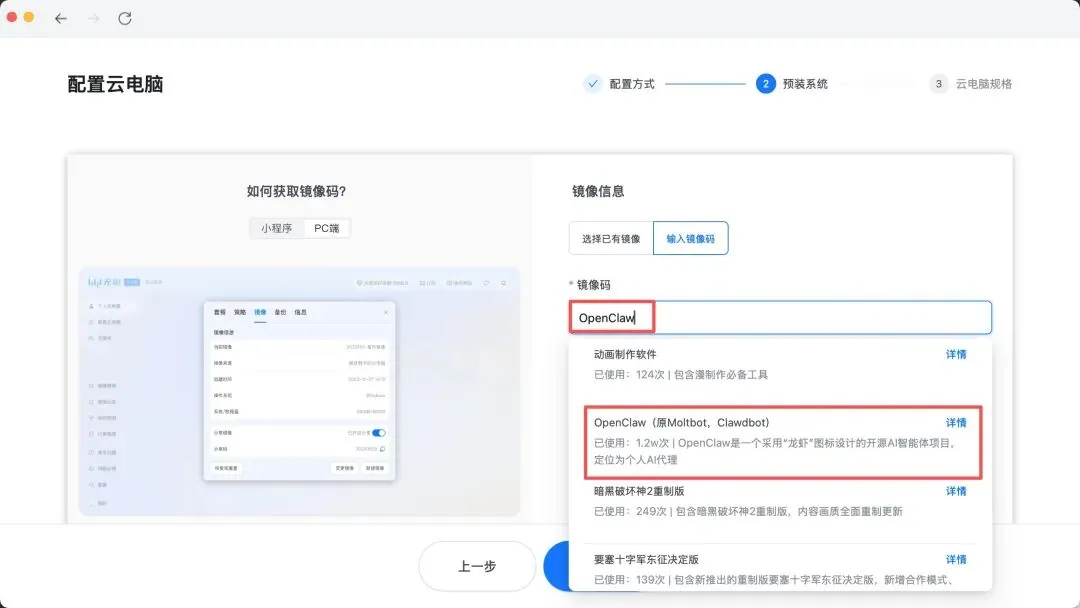
Step two: onboard the digital employee with one-click deployment. There are countless tutorials, but you still need to try it yourself. Search the Wuying image community for OpenClaw; older versions may be called Clawdbot or Moltbot. The platform installs it for you.
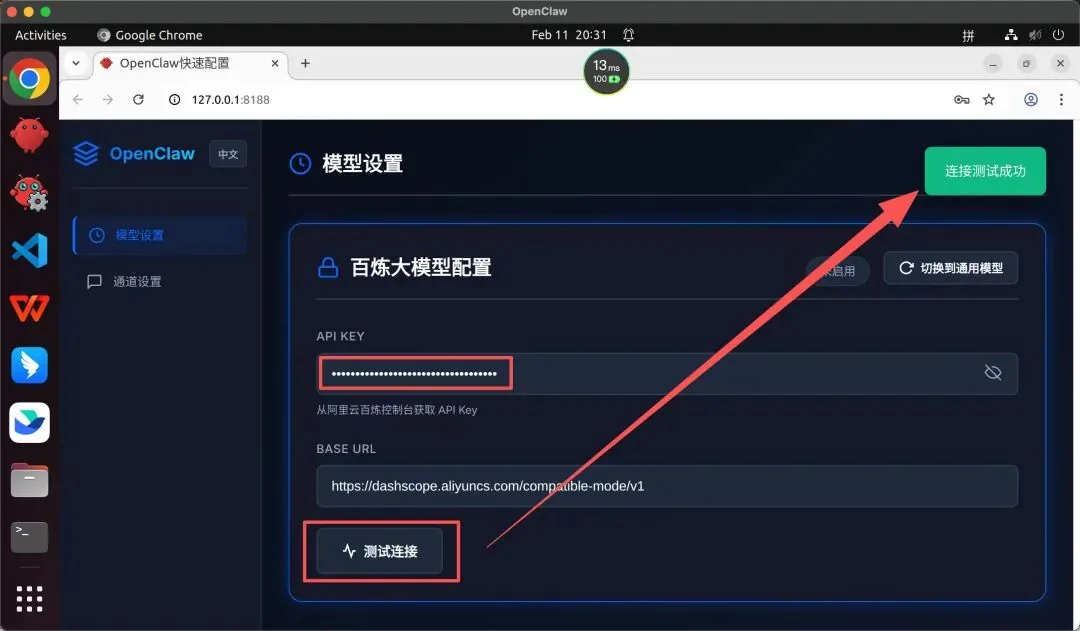
Step three: give it a brain by connecting a model. A fresh OpenClaw installation is an empty shell. Go to Alibaba Cloud's Bailian console and apply for an API key to access Qwen. Qwen-Turbo and Plus offer good value and even free allowances. I chose the cost-effective Kimi 2.5 myself.
Open OpenClaw's settings, find the model settings, and paste in your API key as you would a password. Click Test Connection. A green success message means it is alive!
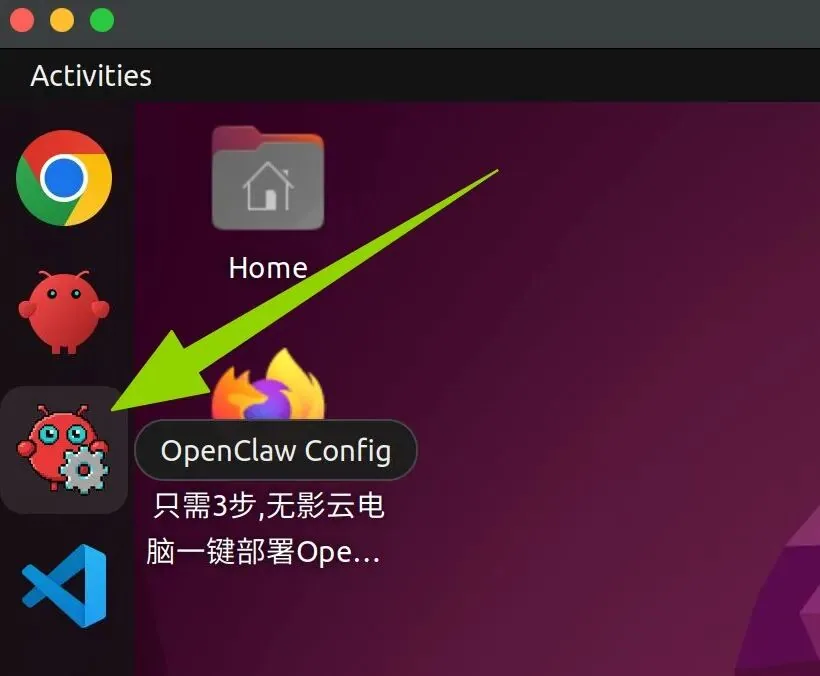
You can now click the lobster button on the taskbar and start trying its abilities.
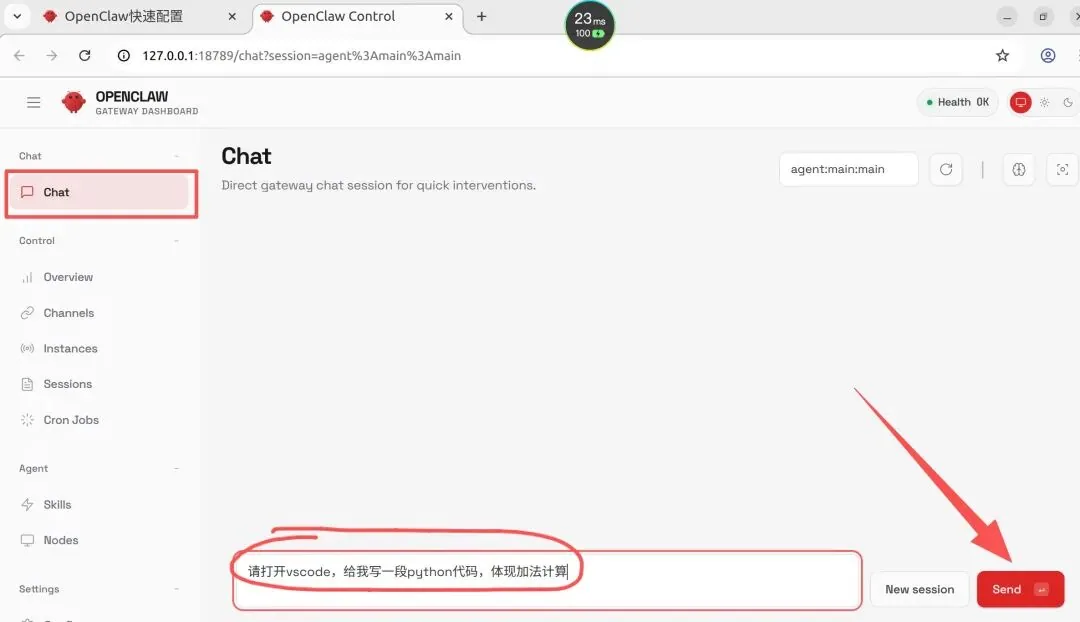
You could stop here. But further exploration brings a few more surprises. The next key step is connecting Feishu; other messaging integrations work similarly. There are quite a few steps, so I have included key screenshots for reference.
Create a custom enterprise application on the Feishu Open Platform (https://open.feishu.cn/app).
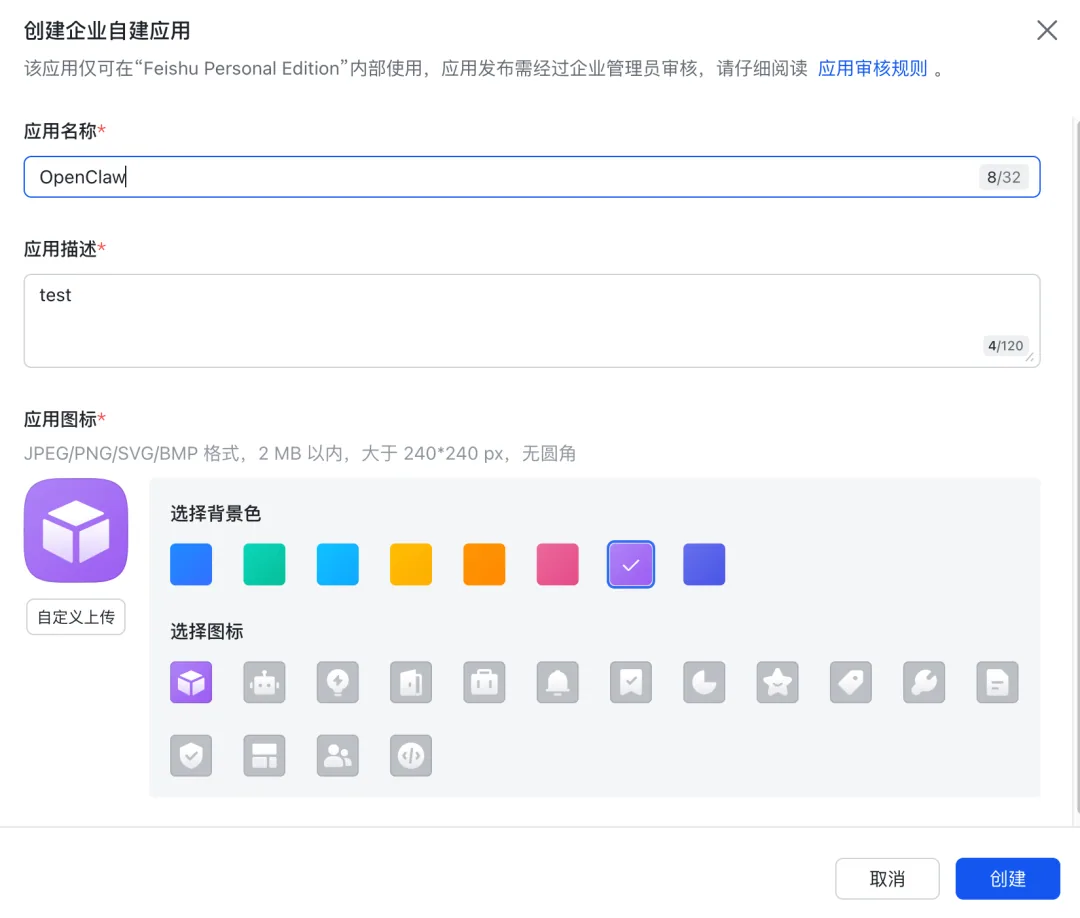
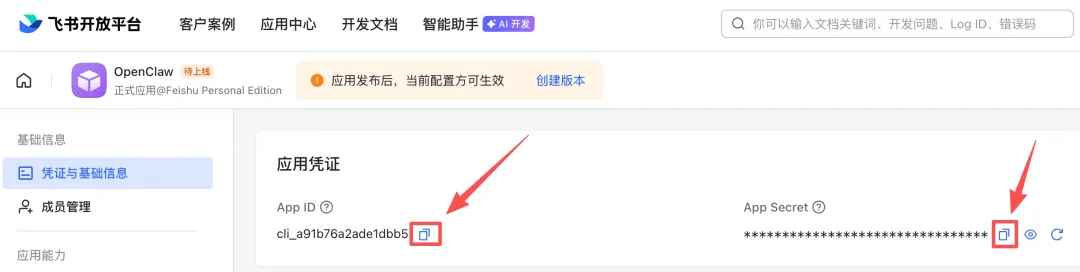
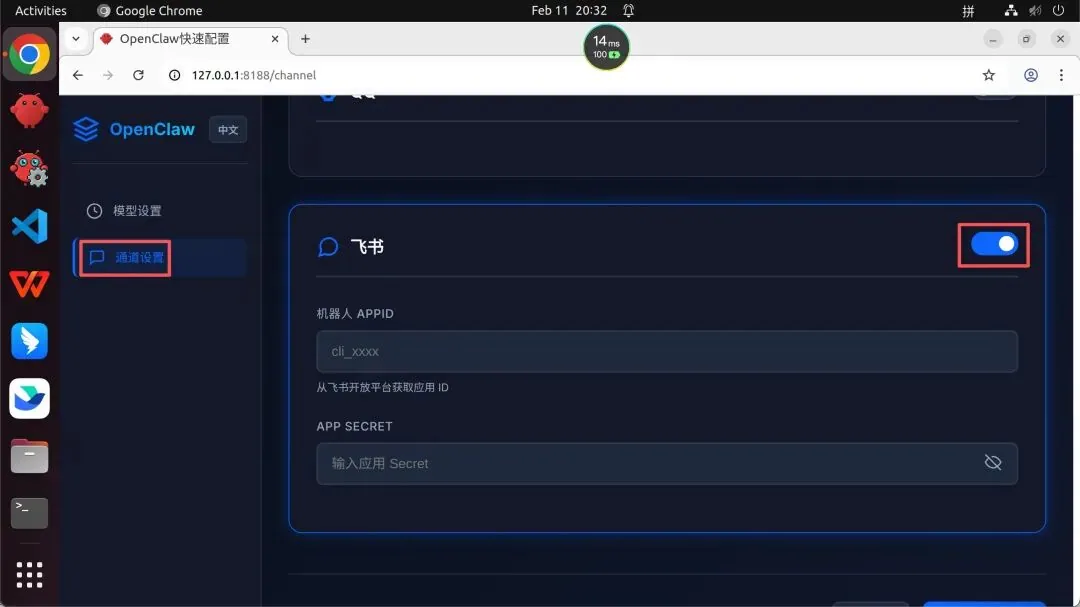
Copy the application's credentials from Feishu into OpenClaw's channel settings.
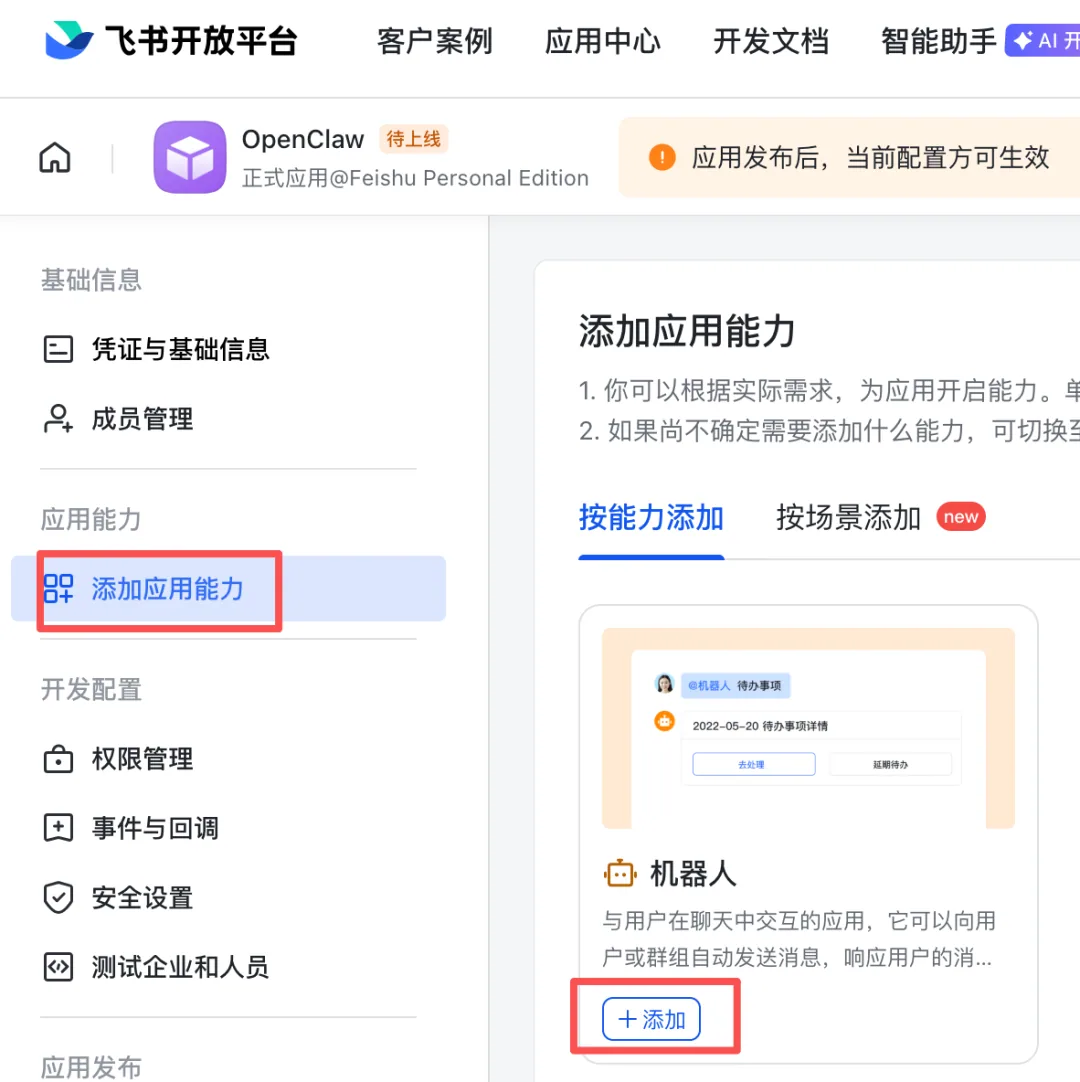
Add the bot capability to the application.
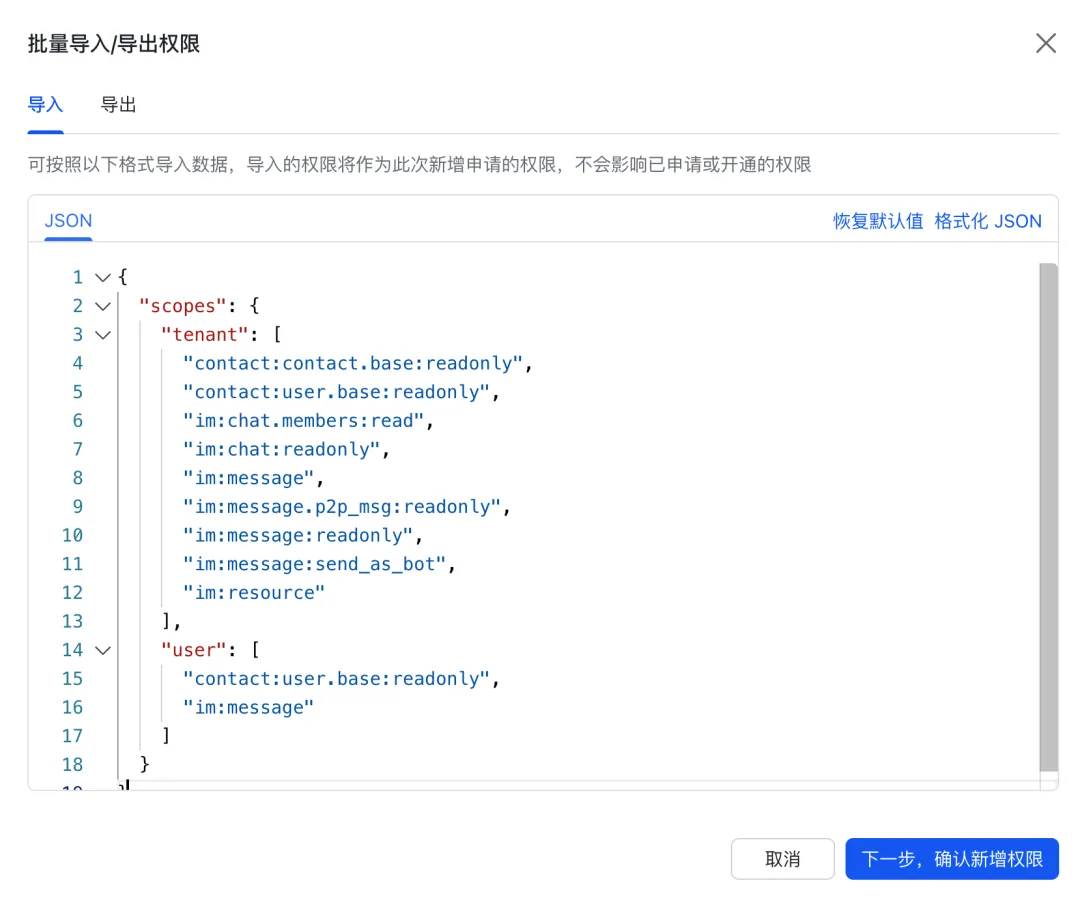
Configure the Feishu application's permissions, either manually or through a batch import.
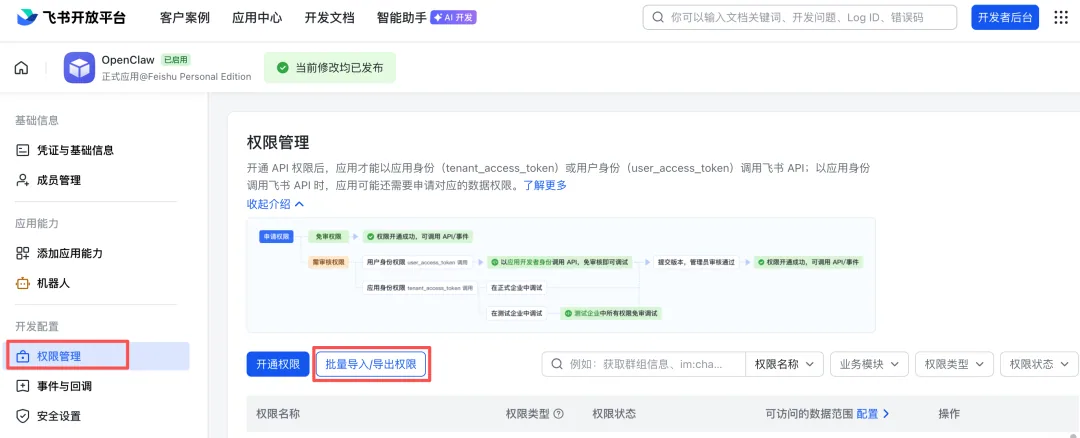
Import permissions in a batch using the content below. My Feishu account is a personal test account. If you are using a work account, review the minimum necessary permissions carefully before continuing. This is very important.
{
  "scopes": {
    "tenant": [
      "contact:contact.base:readonly",
      "contact:user.base:readonly",
      "im:chat.members:read",
      "im:chat:readonly",
      "im:message",
      "im:message.p2p_msg:readonly",
      "im:message:readonly",
      "im:message:send_as_bot",
      "im:resource"
    ],
    "user": [
      "contact:user.base:readonly",
      "im:message"
    ]
  }
}
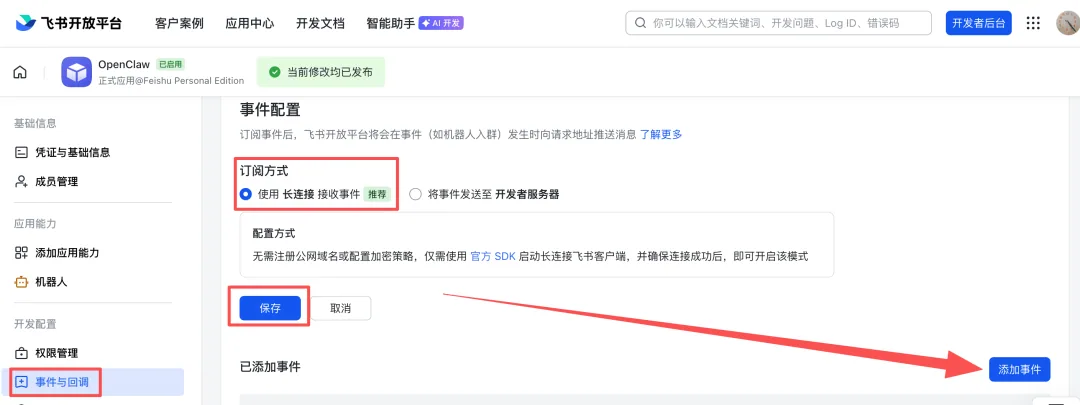
Configure events and callbacks. Choose to receive events over a persistent connection, save, then click Add Event.
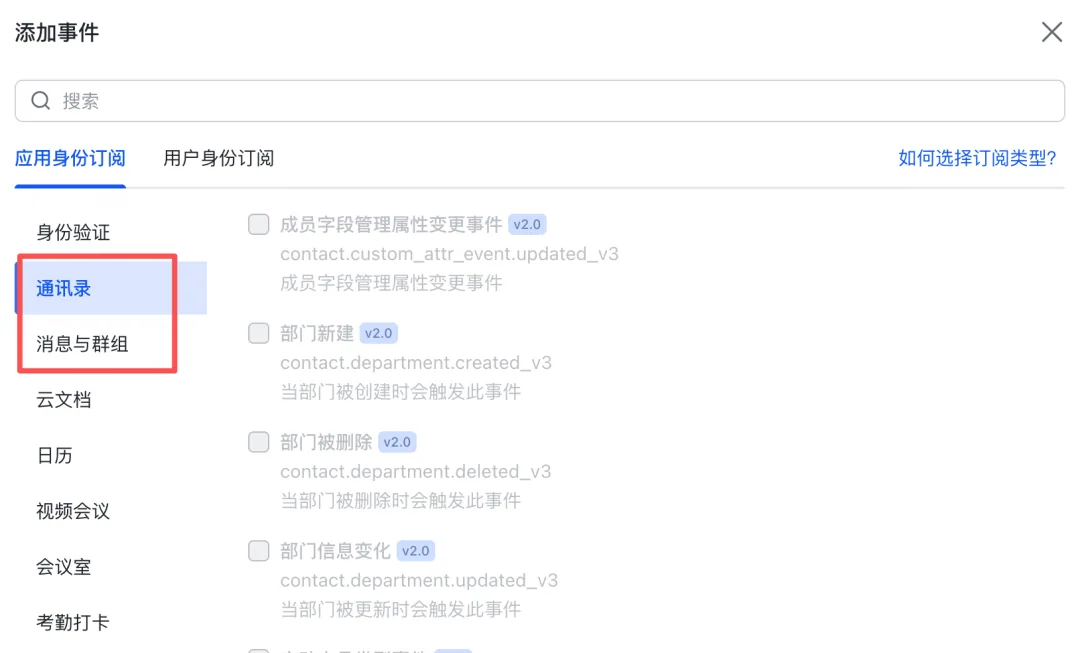
When adding events, enable the permissions required for the features you are testing.
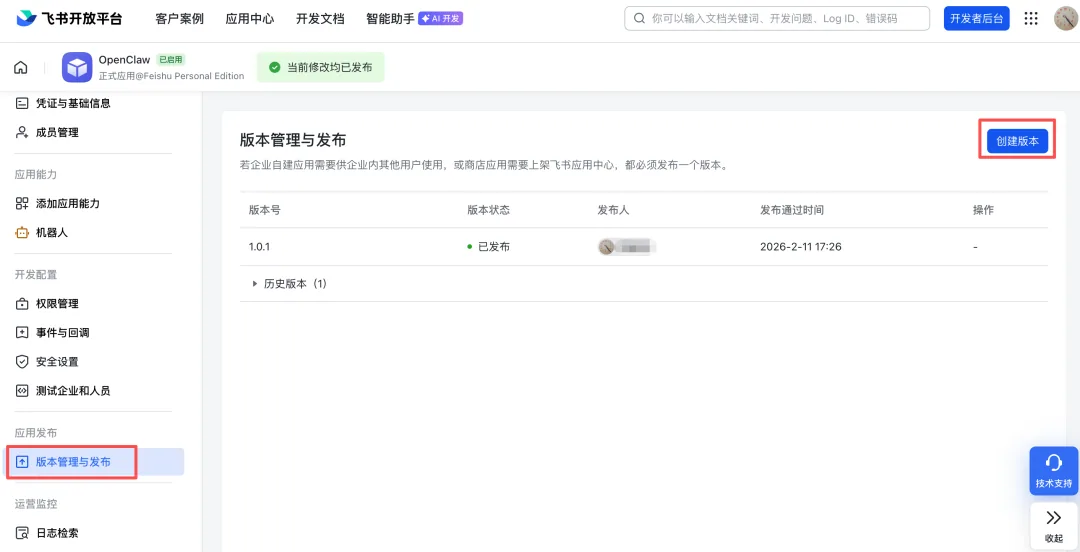
Finally, create a version and publish it. Open the app you just created in Feishu and send instructions in the chat to connect with OpenClaw.
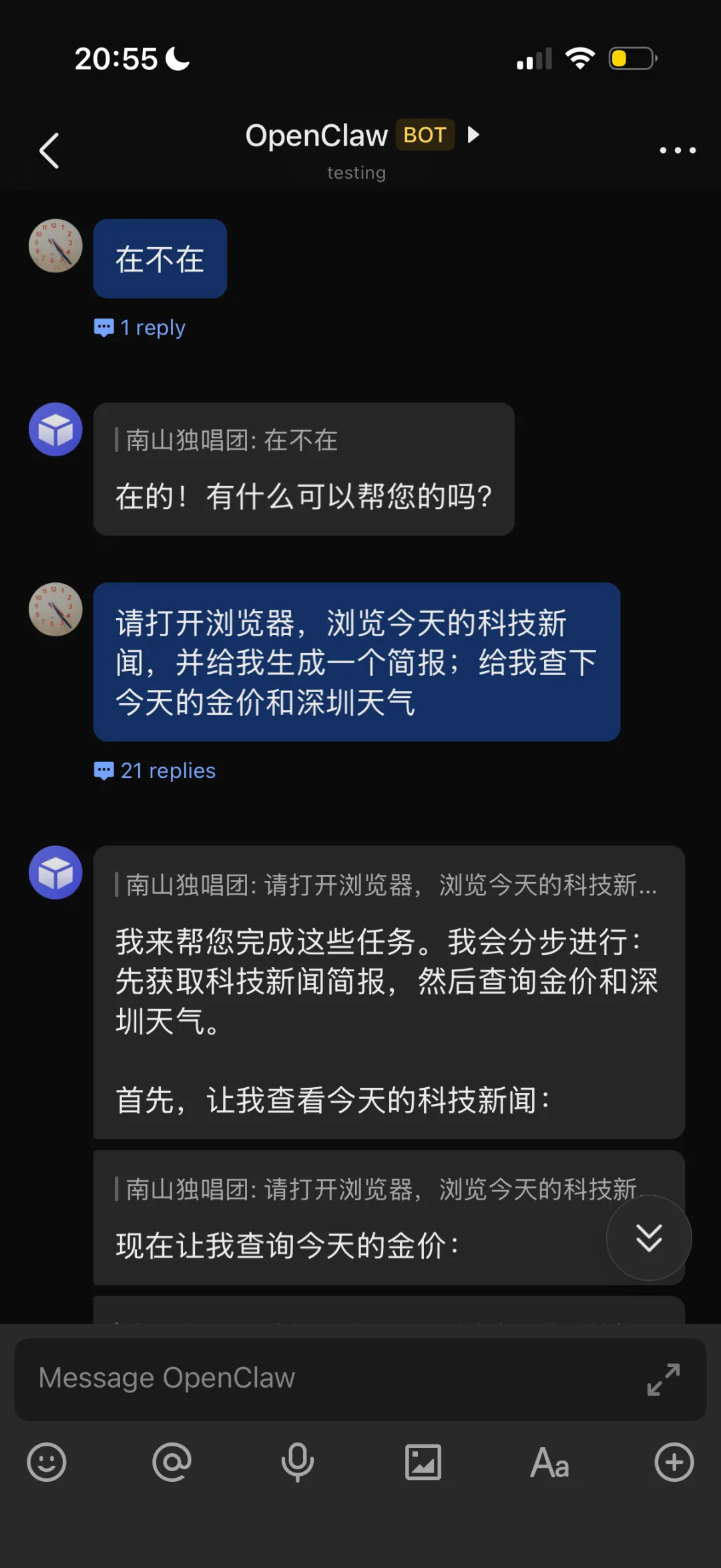
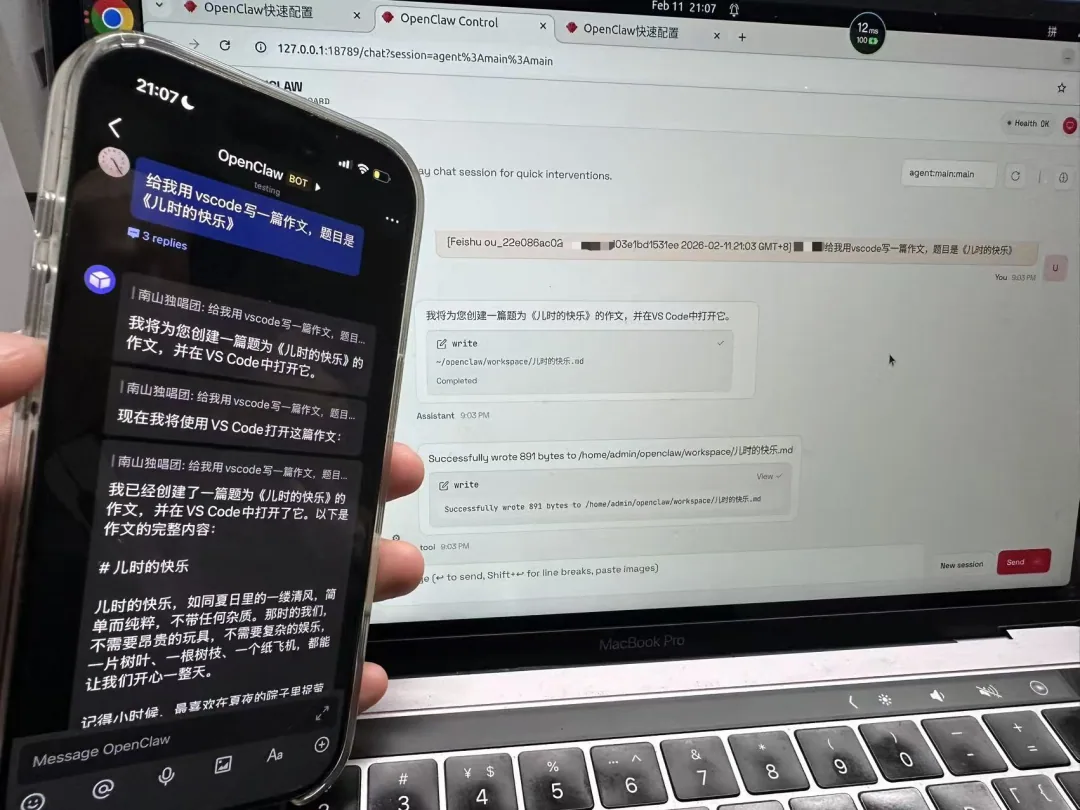
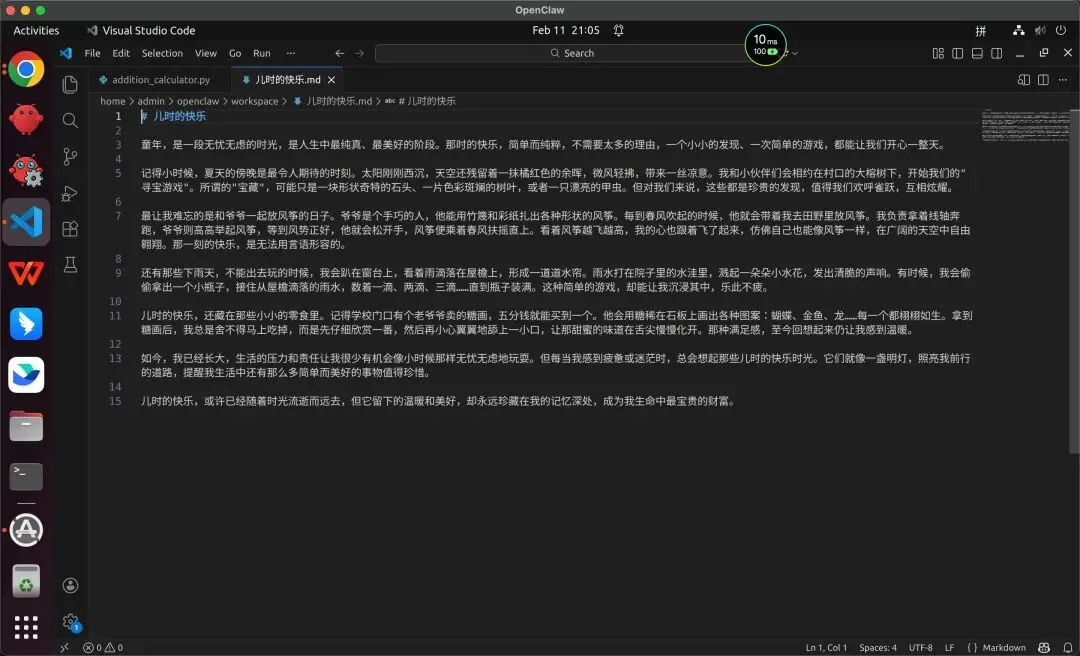
In the screenshot below, I gave it a task from Feishu on my phone. A little later, OpenClaw opened VS Code on my cloud computer and wrote a short assignment. It was quite something to see.
You may run into many problems while deploying it. Be patient and keep trying. You can also leave questions on my WeChat account; I will try to reply when I have time. My feeling after deploying it was that trying it yourself might be one of the most important things you can do right now.
Ultimately, OpenClaw is more than a tool for handling email and schedules. It is a window into new forms of collaboration in the AI era, and a reason to reconsider what is most valuable in human civilization. As machines take on more execution, our ability to set direction, hold to our values, and explore the unknown remains what makes us irreplaceable through waves of technological change.
This has been a very long article. Thank you for reading to the end; I hope it has stirred a few thoughts. Happy New Year, friends!
Security notes
API key security: keep model API keys private. Never expose them in public code or third-party images, where a leak could lead to unauthorized charges. Set daily spending limits and billing alerts to control the risk at its source.
Access control: follow the principle of least privilege when granting OpenClaw permissions. For local execution, allow access only to necessary folders, not unrestricted read/write access to the whole drive. For messaging integrations, enable only the required message and event permissions. Do not blindly grant everything, which risks data leaks or malicious actions.
Containing execution risk: beginners should test on a cloud computer or virtual machine, rather than granting broad access on their primary computer. This helps avoid irreversible damage from mistakes such as deleting files or changing system settings. Start with low-risk tasks, such as managing a schedule or drafting emails, and expand permissions gradually after checking reliability.
Originally published in Chinese on WeChat, 南山独唱团 · Read the original ↗
NextExploring Robot Programming with AI and My 10-Year-Old Son: A Father's Experiment in Learning